MongoDB Atlas Benefits
- Cloud-hosted MongoDB - no local installation needed
- Free tier with 512MB storage
- Automatic backups and security features
- Global cluster deployment options
Instructions:
- 1Navigate to mongodb.com/atlas
- 2Click "Try Free" to create a new account
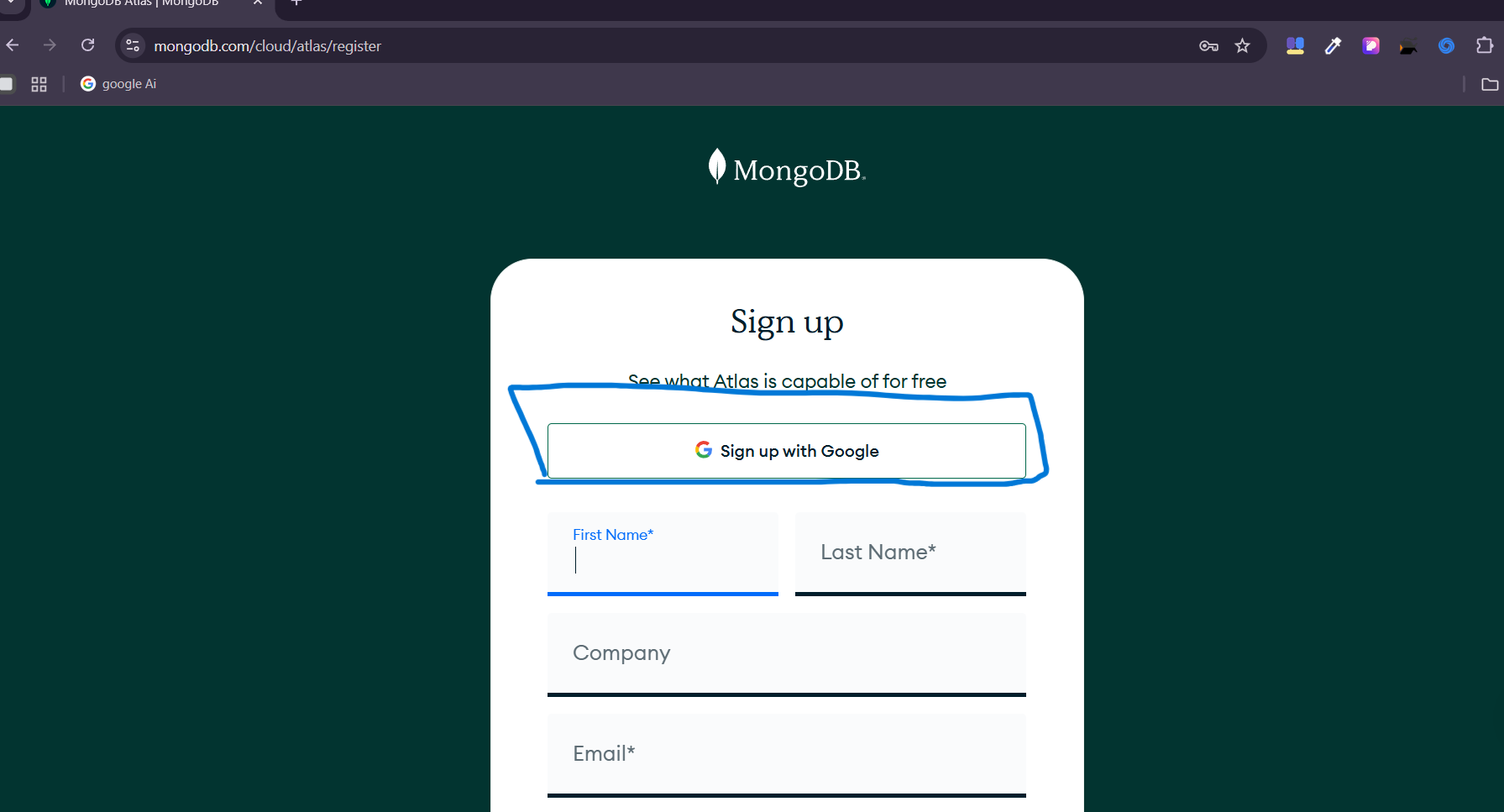
- 3Complete the registration form with your email and password
- 4Or sign up using Google authentication
Visual Guide:
Setup Complete!
Your MongoDB Atlas cluster is now ready for development. Use the connection string in your applications to start building with MongoDB.
If you encounter any errors during setup, please contact us for support.
What's Next?
With MongoDB Atlas configured, continue your database journey:
🚀 Atlas Advanced Features
Security & Compliance
- •End-to-end encryption
- •VPC peering and private endpoints
- •LDAP and SAML authentication
- •SOC 2, HIPAA, PCI DSS compliance
Performance & Scaling
- •Auto-scaling clusters
- •Global cluster distribution
- •Performance advisor
- •Real-time performance metrics
Data Services
- •Atlas Search (full-text search)
- •Data Lake analytics
- •Realm serverless functions
- •Charts data visualization
🏗️ Database Design & Schema Planning
Schema Design Best Practices
MongoDB's flexible document model allows for various schema designs. Understanding when to embed documents versus when to reference them is crucial for optimal performance.
// Embedded Document Pattern (One-to-Few)
const userSchema = {
  _id: ObjectId("..."),
  name: "John Doe",
  email: "john@example.com",
  addresses: [
    {
      type: "home",
      street: "123 Main St",
      city: "New York",
      zipCode: "10001"
    }
  ]
};

// Reference Pattern (One-to-Many)
const authorSchema = {
  _id: ObjectId("..."),
  name: "Jane Smith",
  email: "jane@example.com"
};

const bookSchema = {
  _id: ObjectId("..."),
  title: "MongoDB Guide",
  authorId: ObjectId("..."), // Reference to author
  publishedDate: new Date(),
  pages: 350
};
Indexing Strategies
Proper indexing is essential for query performance. MongoDB Atlas provides tools to analyze and optimize your indexes based on actual query patterns.
// Create indexes for common query patterns

// Single field index
db.users.createIndex({ "email": 1 });

// Compound index for multiple fields
db.products.createIndex({ "category": 1, "price": -1 });

// Text index for search functionality
db.articles.createIndex({
  "title": "text",
  "content": "text"
});

// Geospatial index for location-based queries
db.stores.createIndex({ "location": "2dsphere" });

// Partial index for conditional indexing
db.orders.createIndex(
  { "customerId": 1 },
  { partialFilterExpression: { "status": "active" } }
);

// TTL index for automatic document expiration
db.sessions.createIndex(
  { "createdAt": 1 },
  { expireAfterSeconds: 3600 } // 1 hour
);
⚡ Performance Optimization
Connection Pooling & Management
Efficient connection management is crucial for application performance. MongoDB drivers use connection pooling to reuse database connections.
// Mongoose connection with optimized settings
const mongoose = require('mongoose');

const connectDB = async () => {
  try {
    const conn = await mongoose.connect(process.env.MONGODB_URI, {
      // Connection pool settings
      maxPoolSize: 10, // Maximum number of connections
      minPoolSize: 5,  // Minimum number of connections
      maxIdleTimeMS: 30000, // Close connections after 30s of inactivity
      serverSelectionTimeoutMS: 5000, // How long to try selecting a server
      socketTimeoutMS: 45000, // How long a send or receive on a socket can take

      // Buffering settings
      bufferMaxEntries: 0, // Disable mongoose buffering
      bufferCommands: false, // Disable mongoose buffering

      // Other optimizations
      useNewUrlParser: true,
      useUnifiedTopology: true
    });

    console.log(`MongoDB Connected: ${conn.connection.host}`);

  } catch (error) {
    console.error('Database connection failed:', error);
    process.exit(1);
  }
};
Query Optimization Techniques
Writing efficient queries is essential for good performance. Use projection, limit results, and leverage indexes effectively.
// Efficient query patterns

// Use projection to limit returned fields
const users = await User.find(
  { status: 'active' },
  'name email createdAt' // Only return these fields
).limit(20);

// Use lean() for read-only operations (faster)
const products = await Product.find({ category: 'electronics' })
  .lean() // Returns plain JavaScript objects
  .limit(50);

// Efficient pagination with skip and limit
const page = 2;
const limit = 20;
const skip = (page - 1) * limit;

const paginatedResults = await Article.find({ published: true })
  .sort({ createdAt: -1 })
  .skip(skip)
  .limit(limit)
  .populate('author', 'name email');
🔒 Security Best Practices
Authentication & Authorization
Implement robust authentication and role-based access control to secure your MongoDB Atlas deployment.
// Environment-based connection strings
const getMongoURI = () => {
  const env = process.env.NODE_ENV || 'development';

  const configs = {
    development: {
      uri: process.env.MONGODB_URI_DEV,
      options: {
        maxPoolSize: 5,
        serverSelectionTimeoutMS: 5000
      }
    },
    production: {
      uri: process.env.MONGODB_URI_PROD,
      options: {
        maxPoolSize: 20,
        serverSelectionTimeoutMS: 30000,
        ssl: true,
        sslValidate: true
      }
    }
  };

  return configs[env] || configs.development;
};

// Role-based access control example
const userRoles = {
  ADMIN: 'admin',
  USER: 'user',
  MODERATOR: 'moderator'
};

const checkPermission = (requiredRole) => {
  return (req, res, next) => {
    const userRole = req.user?.role;

    const roleHierarchy = {
      admin: 3,
      moderator: 2,
      user: 1
    };

    if (roleHierarchy[userRole] >= roleHierarchy[requiredRole]) {
      next();
    } else {
      res.status(403).json({ error: 'Insufficient permissions' });
    }
  };
};
Data Encryption & Privacy
Protect sensitive data with encryption at rest and in transit. MongoDB Atlas provides automatic encryption features.
// Input sanitization to prevent injection attacks
const mongoSanitize = require('express-mongo-sanitize');
const validator = require('validator');

app.use(mongoSanitize()); // Remove $ and . from user input

const sanitizeInput = (input) => {
  if (typeof input === 'string') {
    return validator.escape(input); // Escape HTML entities
  }
  return input;
};

// Environment variable validation
const validateEnvironment = () => {
  const required = [
    'MONGODB_URI',
    'ENCRYPTION_KEY',
    'JWT_SECRET'
  ];

  const missing = required.filter(key => !process.env[key]);

  if (missing.length > 0) {
    throw new Error(`Missing required environment variables: ${missing.join(', ')}`);
  }
};
📊 Monitoring & Analytics
Performance Monitoring
MongoDB Atlas provides comprehensive monitoring tools. Set up custom alerts and track key performance metrics.
// Custom performance monitoring middleware
const performanceMonitor = (req, res, next) => {
  const startTime = Date.now();

  // Override res.json to capture response time
  const originalJson = res.json;
  res.json = function(data) {
    const responseTime = Date.now() - startTime;

    // Log slow queries (> 1000ms)
    if (responseTime > 1000) {
      console.warn(`Slow query detected: ${req.method} ${req.path} - ${responseTime}ms`);

      // Send to monitoring service
      MonitoringService.logSlowQuery({
        method: req.method,
        path: req.path,
        responseTime,
        query: req.query,
        body: req.body,
        timestamp: new Date()
      });
    }

    // Add performance headers
    res.set('X-Response-Time', `${responseTime}ms`);

    return originalJson.call(this, data);
  };

  next();
};

// Database connection monitoring
mongoose.connection.on('connected', () => {
  console.log('✅ MongoDB connected successfully');
  MonitoringService.logEvent('DB_CONNECTED', { timestamp: new Date() });
});

mongoose.connection.on('error', (err) => {
  console.error('❌ MongoDB connection error:', err);
  MonitoringService.logError('DB_CONNECTION_ERROR', err);
});
💾 Backup & Disaster Recovery
Automated Backup Configuration
MongoDB Atlas provides automated backups with point-in-time recovery. Configure backup policies to meet your business requirements.
// Backup verification script
const verifyBackups = async () => {
  try {
    // Check if backups are enabled
    const clusterConfig = await getClusterConfiguration();

    if (!clusterConfig.backupEnabled) {
      throw new Error('Backups are not enabled for this cluster');
    }

    // Verify recent backup exists
    const recentBackups = await getRecentBackups(7); // Last 7 days

    if (recentBackups.length === 0) {
      throw new Error('No recent backups found');
    }

    console.log(`✅ Found ${recentBackups.length} backups in the last 7 days`);

    // Test backup integrity (if supported)
    const latestBackup = recentBackups[0];
    const integrityCheck = await testBackupIntegrity(latestBackup.id);

    if (integrityCheck.status === 'valid') {
      console.log('✅ Latest backup integrity verified');
    } else {
      console.error('❌ Backup integrity check failed');
    }

  } catch (error) {
    console.error('Backup verification failed:', error.message);

    // Send alert to administrators
    await sendAlert({
      type: 'BACKUP_VERIFICATION_FAILED',
      message: error.message,
      timestamp: new Date()
    });
  }
};

// Disaster recovery procedures
class DisasterRecovery {
  static async createRecoveryPlan() {
    return {
      // RTO: Recovery Time Objective
      rto: '4 hours',

      // RPO: Recovery Point Objective
      rpo: '1 hour',

      procedures: [
        {
          step: 1,
          action: 'Assess the scope of the disaster',
          timeEstimate: '15 minutes'
        },
        {
          step: 2,
          action: 'Identify the most recent valid backup',
          timeEstimate: '10 minutes'
        },
        {
          step: 3,
          action: 'Restore from backup to new cluster',
          timeEstimate: '2-3 hours'
        }
      ]
    };
  }
}

// Automated backup monitoring
setInterval(verifyBackups, 24 * 60 * 60 * 1000); // Daily backup verification
📖 Learning Resources
Official Documentation
Tutorials & Courses
💡 Pro Tip: Always use environment variables for connection strings and never commit them to version control. Use .env files locally.